macOS video editor Apple Silicon Software asset for acquisition

Edit video. Run AI. Stay offline.

A native Mac video editor with on-device transcription, voiceover, auto-editing and image generation. No cloud APIs, no accounts, no telemetry.

Packaged app v0.1.0 63 automated tests Zero running costs

Kadr Studio editor with an AI-generated coastline in the preview, the title "COASTLINE" and a Whisper caption, a media library of AI-generated stills, the project inspector, and a five-track timeline of titles, captions, video, voiceover and music. The top bar has the 16:9 / 9:16 / 1:1 switch, the LOCAL / OFFLINE indicator and an interface language picker set to English.
Real app screenshot demo made with its own local AI

Network log · 0 requests

The LOCAL / OFFLINE dialog: all AI models run on this computer, no cloud AI APIs or accounts, no telemetry, media never leaves the computer, AI processes talk over local pipes with no network ports, the interface cannot reach the network; 0 blocked network requests and a network log reading "No network access so far."

The asset, at a glance.

  1. Packaged macOS appSelf-contained .app + .dmg for Apple Silicon, v0.1.0
  2. Full source codebaseCompact and readable: ≈ 8.7k lines of TypeScript + Python, incl. EN/RU dictionaries
  3. Local AI pipeline10 on-device features behind 9 provider interfaces
  4. 63 automated tests48 unit/integration · 7 worker · 8 end-to-end
  5. Docs + licence auditArchitecture, build guide, every model and native component

0Zero running costs. No servers, no cloud AI APIs, no per-user bills — everything runs on the user’s Mac.

See what’s included

A multitrack editor, a local AI studio and a subtitle workstation — in one Mac app that never phones home on its own.

Popular consumer editors send speech, voice and generation jobs to their servers, behind sign-ins and credits. Kadr Studio does that work on the user’s own machine.

Where the AI work happens: a typical cloud editor uploads media from the device to a server, charges per job and sends the result back. Kadr Studio keeps every step on the device.

A complete editing workspace.

Media library, multitrack timeline, live preview, inspector and AI panel — in one window.

Every screenshot on this page is the real app. The interface ships in English and Russian: it follows the system language and switches in the app (top bar or View → Language) without a restart.

Kadr Studio editor with an AI-generated coastline in the preview, the title "COASTLINE" and a Whisper caption, a media library of AI-generated stills, the project inspector, and a five-track timeline of titles, captions, video, voiceover and music. The top bar has the 16:9 / 9:16 / 1:1 switch, the LOCAL / OFFLINE indicator and an interface language picker set to English.
FIG 04 EDITOR OVERVIEW REAL APP
  1. 01 Media library

    Thumbnails, duration, resolution, fps and size for every import.

    Detail of the editor overview screenshot. Kadr Studio editor with an AI-generated coastline in the preview, the title "COASTLINE" and a Whisper caption, a media library of AI-generated stills, the project inspector, and a five-track timeline of titles, captions, video, voiceover and music. The top bar has the 16:9 / 9:16 / 1:1 switch, the LOCAL / OFFLINE indicator and an interface language picker set to English.
    1. Media library · AI-generated stills
    Real app screenshot
  2. 02 Viewer + formats

    Live preview with frame-accurate timecode; a 16:9 / 9:16 / 1:1 switch in the top bar.

    Detail of the editor overview screenshot. Kadr Studio editor with an AI-generated coastline in the preview, the title "COASTLINE" and a Whisper caption, a media library of AI-generated stills, the project inspector, and a five-track timeline of titles, captions, video, voiceover and music. The top bar has the 16:9 / 9:16 / 1:1 switch, the LOCAL / OFFLINE indicator and an interface language picker set to English.
    1. Live preview: title + Whisper caption
    2. Frame-accurate timecode
    Real app screenshot
  3. 03 Inspector

    Transform, speed, volume, fades, colour and transitions per clip.

    Detail of the editor overview screenshot. Kadr Studio editor with an AI-generated coastline in the preview, the title "COASTLINE" and a Whisper caption, a media library of AI-generated stills, the project inspector, and a five-track timeline of titles, captions, video, voiceover and music. The top bar has the 16:9 / 9:16 / 1:1 switch, the LOCAL / OFFLINE indicator and an interface language picker set to English.
    1. Inspector · project and clip properties
    Real app screenshot
  4. 04 Timeline

    Video, audio, text and subtitle tracks with snapping, markers and 200-step undo.

    Detail of the editor overview screenshot. Kadr Studio editor with an AI-generated coastline in the preview, the title "COASTLINE" and a Whisper caption, a media library of AI-generated stills, the project inspector, and a five-track timeline of titles, captions, video, voiceover and music. The top bar has the 16:9 / 9:16 / 1:1 switch, the LOCAL / OFFLINE indicator and an interface language picker set to English.
    1. AI voiceover clip with waveform
    2. 5 tracks
    Real app screenshot

See it work.

60 unedited seconds of the packaged app on an M4, in its English interface: playback, a split and undo, an image generated on-device, and Auto Reframe to 9:16 and back. One continuous take, no network.

Screen recording of the packaged app Apple M4, 16 GB all AI ran locally no audio or cursor

Multitrack editing that keeps up.

Video, audio, text and subtitle tracks with the tools editors expect. A 99-clip, 4-track project stays at 60 fps.

  • SpacePlay / pause
  • SSplit at playhead
  • BBlade tool
  • QTrim head
  • WTrim tail
  • ⌘ZUndo
  • ⌘DDuplicate
  • NSnapping
  • MMarker
Illustrative · not a screenshot

The playhead moves to 4 seconds, S splits the aerial coast clip in two, Q trims one second from the head of the left part, and the AI voiceover clip snaps to the playhead.

Split 13–15 ms on 99 clips60 fps playback200-step undoSnappingMute / lock / hide

Cut
Trim Split Blade Ripple delete Duplicate Snapping Markers
Shape
Crop Scale Position Rotate Opacity Picture-in-picture
Time
Speed 0.1–8× Reverse Freeze frame Fade in / out
Join
Cut Fade Dissolve Wipe Slide
Effects tab with speed presets, colour presets, fade in and out, rotation, Reverse and Freeze Frame; the inspector shows brightness, contrast and saturation and the "Transition In" chips with Dissolve active.
  1. Speed presets
  2. Colour presets
  3. Transition at clip start
FIG 06 EFFECTS PANEL REAL APP
Transitions panel: Cut, Fade (through black), Dissolve, Wipe (left to right) and Slide (from right), with Dissolve selected, a duration field and a "Dissolve All Cuts on Track" button.
FIG 06.2 TRANSITIONS REAL APP

Subtitles in one click. Styled, editable, burned in.

Transcribe locally, get a caption track, fix any word, export SRT, VTT or TXT — or import an existing SRT.

Illustrative · 9:16

As the playhead crosses each speech peak, the next word of the subtitle appears, ending with the full line: Everything runs on this Mac, even offline.

Transcript · auto-generated, editable

  1. 00:00:00:00 → 00:00:01:10Everything runs
  2. 00:00:01:10 → 00:00:02:14on this Mac,
  3. 00:00:02:14 → 00:00:03:20even offline.

Language

  • RU
  • EN
  • Auto

Export

  • SRT
  • VTT
  • TXT
  • Burn-in

Full text styling, track-wide.

Font, weight, colour, background, outline, shadow and position — set once and applied to every subtitle on the track, then burned in on export. Titles get the same controls plus five presets.

Roadmap: word-level captions

Captions tab with four English captions generated locally by Whisper, each with editable start and end times, the caption rendered in the preview, and style controls (font Inter, size 58, weight 700, outline, shadow, position) with an "Apply Style to All Captions on Track" button.
  1. Whisper lines, editable timing
  2. Caption rendered in the preview
  3. Style applies to the whole track
FIG 05 CAPTIONS PANEL REAL APP

The AI runs here. Not on someone else’s server.

Ten on-device features behind nine provider interfaces. Partial features are labelled — never hidden.

Animations are illustrative; the captures beside them are the real app timings: Apple M4, 16 GB RAM

One edit. Three formats.

The demo teaser in 16:9, reframed to 9:16 and to 1:1 by Auto Reframe — face-aware where it finds a face, centred where it doesn’t.

  1. Detail of the effects + colour screenshot. Effects tab with speed presets, colour presets, fade in and out, rotation, Reverse and Freeze Frame; the inspector shows brightness, contrast and saturation and the "Transition In" chips with Dissolve active.
    16:9 1920×1080
  2. Detail of the auto reframe 9:16 screenshot. The same teaser reframed to vertical 9:16 (1080×1920): a cyclist on a sunlit road with an English caption, the Auto Reframe panel with face detection enabled, and a notice reading "Reframed to 9:16: faces found in 0 of 6 clips".
    9:16 1080×1920
  3. Detail of the reframe 1:1 screenshot. The teaser reframed to a 1080×1080 square: an AI-generated neon street at night; no faces were found, so the framing is centred.
    1:1 1080×1080

Real app captures, preview area demo project made with the app’s own AI

Every model, its size and its licence — in the app.

The Model Manager installs optional models only when the user asks, shows size, RAM, licence and commercial terms for each, and marks what is built in. Nothing downloads automatically. Listed download sizes are 0.2–3.6 GB per model — about 8.5 GB for every model this page describes.

“Used: 18.0 GB” in the capture is the test Mac’s disk: about 15 GB for this page’s models as installed, plus two Whisper variants the demo does not use.

Model Manager table with all ten local AI models: Whisper large-v3 (q5_0), Whisper small and Whisper large-v3 (fp16), Silero VAD, Chatterbox Multilingual, RUAccent, U²-Net, YuNet, Stable Diffusion 1.5 + LCM-LoRA and AnimateDiff-Lightning, each with size and RAM, licence and commercial-use note, purpose, and installed or built-in status, all marked "works offline".
  1. Size / RAM per model
  2. Installed · works offline
  3. Built into the app
  4. Licence + commercial terms
FIG 08 MODEL MANAGER REAL APP

Edit 4K HDR phone footage without the stutter.

Heavy sources play from lightweight proxies automatically. Exports always use the originals.

Illustrative · proxy workflow
  1. Original4K60 HEVC HLGSource untouched
  2. Proxy720p H.264 · GPU tone-map6-s clip in ~6.5 s
  3. EditPlays the proxy60 fps · p95 18 ms
  4. ExportFrom the originalH.264/AAC · 720p–4K

A 6-second 4K60 HDR original gets a 720p proxy with GPU tone-mapping in about 6.5 seconds on an Apple M4; editing plays the proxy at 60 fps; export renders from the original.

4K, HEVC, HDR and ProRes get 720p edit proxies HDR is tone-mapped to SDR (macOS) no HDR export

Hardware export at 6.5× realtime.

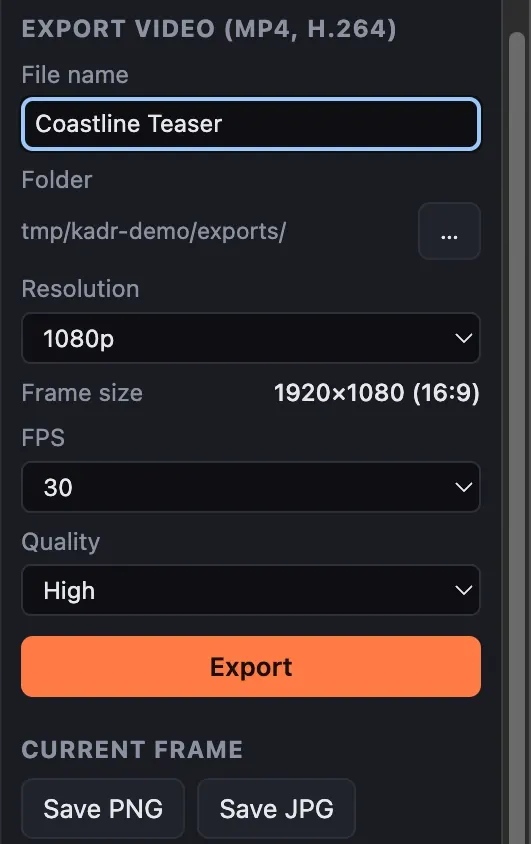
  • MP4 H.264 + AAC
  • 720p · 1080p · 4K
  • 24 / 25 / 30 / 50 / 60 fps
  • 3 quality levels
  • PNG / JPG frame export
  • Cancel leaves no partial file
  1. Detail of the export settings screenshot. Export panel for MP4 H.264: file name, folder, 1080p, 30 fps, High quality, plus current-frame PNG / JPG and SRT / VTT caption export.
    01 Settings 1080p H.264
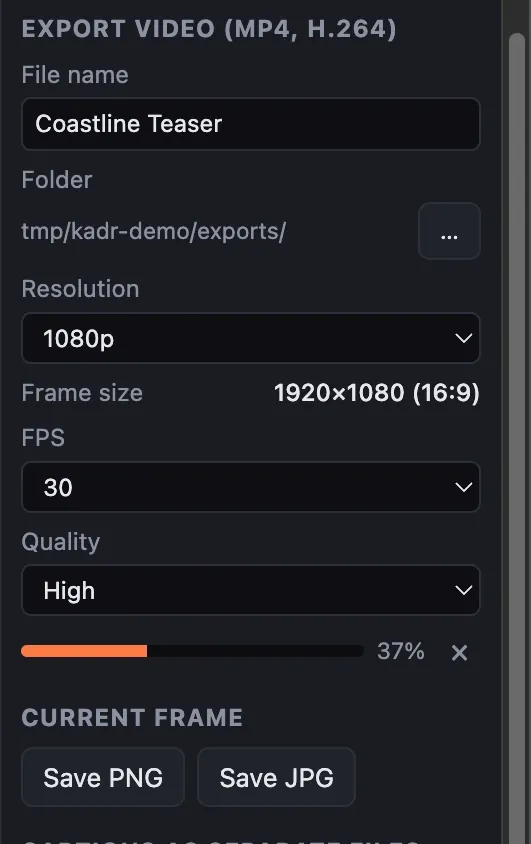
  2. Detail of the export in progress screenshot. Export in progress at 37 percent, with an inline progress bar and a job indicator in the top bar.
    02 Exporting 37%
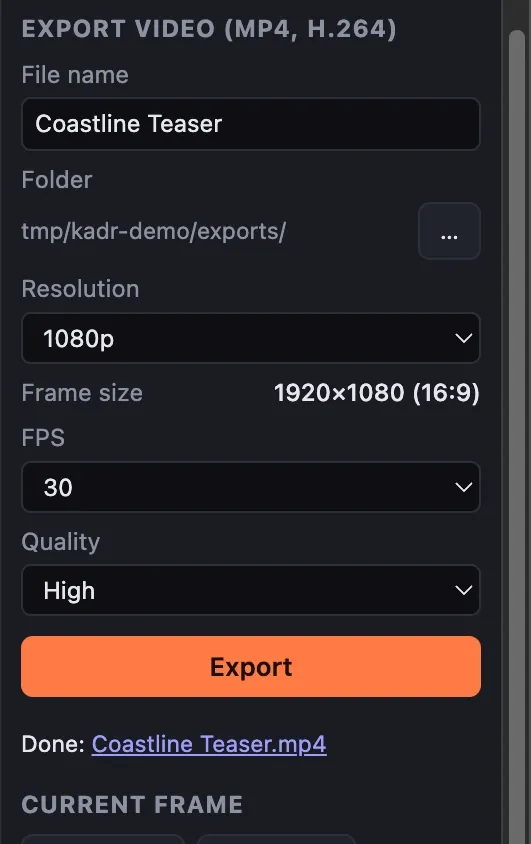
  3. Detail of the export finished screenshot. Export finished: a notice reads "Export finished in 3.8 s" and the panel links to the exported MP4.
    03 Done link to the file

FIG 09 Real app the 20 s demo timeline exported in 3.8 s

Your work is always saved. Twice.

Autosave within 1.5 seconds of every change, atomic writes and an automatic backup copy.

Autosave
1.5 s after a change, every 30 s, on quit
Atomic write
temp file → rename, plus a backup copy
Corrupt file
falls back to the backup
Move the folder
relative + absolute media paths
Missing media
relink in place
Sources
never modified; every AI result is a new file
Detail of the start screen screenshot. Kadr Studio start screen with a new-project form (name, 16:9 / 9:16 / 1:1 aspect ratio, folder), three recent projects and an interface language picker set to English.
FIG 09.2 START SCREEN REAL APP
Generic illustration

Offline isn’t a mode. It’s the architecture.

Network access is blocked at three layers, and every request is logged where the user can see it. The only traffic is a model download the user explicitly starts.

The LOCAL / OFFLINE dialog: all AI models run on this computer, no cloud AI APIs or accounts, no telemetry, media never leaves the computer, AI processes talk over local pipes with no network ports, the interface cannot reach the network; 0 blocked network requests and a network log reading "No network access so far."
  1. Six guarantees: local models, no cloud APIs, no telemetry…
  2. Blocked network requests: 0
  3. Network activity log: “No network access so far.”
FIG 10 LOCAL / OFFLINE DIALOG REAL APP

Illustrative · the enforcement layers, summarised

  1. [ok] renderer · content security policy denies every network connection
  2. [ok] main · outbound requests blocked and written to the visible log
  3. [ok] speech worker · offline mode · stdin/stdout · no open ports
  4. [ok] vision worker · offline mode · stdin/stdout · no open ports
  5. [ok] e2e test · import → edit → transcribe → voice → subtitle → export, network denied by the OS kernel
Network requests during the full run0

Illustrative summary: the interface, the main process and both AI workers are offline, the full workflow runs, and the network request count stays at zero.

Verified end to endA test runs the whole workflow with networking denied at the OS kernel level. The dialog on the left is what the app reported after generating the images, video, voiceover and subtitles used on this page.

Built like a product, not a prototype.

A sandboxed Electron shell, a pure TypeScript editing core, an LGPL FFmpeg build and out-of-process AI workers — each layer replaceable.

Architecture · top to bottom
  1. L1InterfaceReact + Zustand · canvas compositor · Web Audio · sandboxed, CSP-locked
  2. L2Desktop shellElectron main process · IPC · job system with lanes, progress, cancel
  3. L3Editing corePure TypeScript: project model, timeline ops, undo, frame model, export graph
  4. L4Media engineCustom LGPL FFmpeg build · VideoToolbox encode/decode · GPU HDR tone-mapping
  5. L5AI workerswhisper.cpp on Metal · Python 3.12: PyTorch MPS, ONNX Runtime + Core ML, OpenCV
  6. L6Platform layermacOS (Apple Silicon) verified · Windows layer written, not yet run on Windows

Will it run? Requirements and facts

Hardware
Apple Silicon (M1–M4). Intel Macs not supported.
OS
macOS 13 or later
Memory
8 GB for editing, transcription, voiceover · 16 GB for video generation
Disk
~3 GB app + optional models (listed 0.2–3.6 GB each, ≈ 8.5 GB for every model on this page; ≈ 15 GB on disk once installed on the test Mac)
Bundle
.app ≈ 2.9 GB · .dmg ≈ 1.4 GB
Launch
1–2 s (first launch 15–30 s for macOS verification)
Import
6 video containers · 7 audio formats · 8 image formats incl. HEIC, animated GIF
Export
MP4 H.264 + AAC · PNG / JPG frames
Signing
Ad-hoc signed · not notarized
Localization
English, Russian · typed dictionaries: a new language is mainly a new dictionary file
Codebase
Compact and readable: ≈ 8.7k lines of app code (≈ 7.5k TypeScript incl. ≈ 1.35k lines of EN/RU dictionaries, ≈ 1.2k Python) plus build scripts
Running costs
None built in: no servers, cloud AI APIs or accounts
  • Heavy work out of process

    FFmpeg, whisper.cpp and Python workers run as child processes. The UI stays at 60 fps during export, proxies and AI jobs.

  • Provider interfaces

    Nine typed provider interfaces. Replacing a model means replacing a provider; preview and export share one frame model.

  • Pure editing decisions

    Auto Cut, highlights, reframing and silence cuts are unit-tested functions that propose a change.

  • Self-contained runtime

    A bundled, relocatable Python 3.12 with two isolated AI environments. The user installs nothing.

Tested end to end. Measured, not estimated.

The benchmarks below come from recorded runs on an Apple M4 with 16 GB RAM (04.10.2026). Per-feature AI timings elsewhere on the page are stated measurements on the same machine.

  • Export · 3:06 timeline → 1080p

    28.6s

    6.5× realtime · 99 clips · 4 tracks

    bar = render time vs. timeline length · Recorded run 04.10.2026

  • UI during playback, export, proxies

    60fps

    p95 frame time 18 ms

    bar = 60 fps target · Recorded run 04.10.2026

  • Split on a 99-clip project

    13ms

    13–15 ms measured

    bar = one frame at 60 fps (16.7 ms) · Recorded run 04.10.2026

  • Memory, all processes

    <900MB

    845 MB source · 889 MB installed app

    bar = share of 16 GB · Recorded run 04.10.2026

  • Automated tests

    63

    48 unit/integration · 7 worker · 8 e2e

    run 06.10.2026 · longest model test run on its own · Recorded run 04.10.2026

The test run

  • 41 unit + integration tests · many run real FFmpeg, Whisper and TTS
  • 7 AI-worker protocol tests · speech and vision workers
  • 6 end-to-end UI scenarios · drive the real Electron UI
  • acceptance flow
  • full offline run (kernel-level network deny)
  • AI editing
  • model management
  • error handling
  • load test

All green on 04.10.2026 — from source and against the installed app with every development dependency hidden.

19 issues found and fixed during verification and packaging (11 in QA, 8 in packaging) — documented in the technical package.

Feature status, item by item

Done · 16 items, each covered by a test or a verified run

  • Multitrack timeline: trim, split, ripple, snapping
  • Transforms, picture-in-picture, reverse, freeze
  • Transitions
  • Text titles + presets
  • Subtitles + SRT / VTT / TXT
  • Speech-to-text
  • Voiceover
  • Silence detection + removal
  • Background removal
  • Image generation
  • Proxy workflow + hardware export
  • Projects: autosave, backup, relink
  • Model Manager + licence data
  • Offline enforcement + network log
  • Packaged .app + .dmg
  • Interface localization (EN/RU)
Partial features and roadmap items, with notes
Partial + roadmapStatusNote
Scene detection + highlightsPartialCut-mapping defect (quick fix); highlights are markers
Auto Cut proposalsPartialSilence rules; scene rules wait on scene fix
Auto ReframePartialBeta: one framing per clip
Audio clean-upPartialDenoise is DSP, not neural
Colour + speedPartialBasic: no curves/LUTs, constant speed
Video generationPartialExperimental: 512×288, 2–3 s, 16 GB
HDR sourcesPartialTone-mapped to SDR, macOS
Voice cloningPartialEngine only, no UI
WindowsPartialPlatform layer prepared, not yet run on Windows
Keyframes + animationsRoadmapUnlocks continuous reframe
Word-level captions + transcript editingRoadmapWhisper segments exist
Masks, chroma key, stabilizationRoadmapOpportunity

What you acquire.

A working product today, and the cheapest next steps to take it further. Opportunities, not commitments.

The package

  • Full source code (TypeScript + Python)Included
  • Reproducible macOS build → .app + .dmgIncluded
  • Unit, worker and end-to-end test suitesIncluded
  • Model Manager + swappable AI providersIncluded
  • Licence audit: every model and native componentIncluded
  • Project documentationIncluded
  • Brand assets: name, app iconIncluded
  • Windows platform layerPartial
  • Running costs: servers, API keys, per-user cloud billsNone

Also: a portable editing core with no OS dependencies and a build that bundles its own runtime. The exact list of deliverables is confirmed during due diligence.

Opportunity roadmap

  1. Quick wins
    • Scene-cut mapping fix → Auto Cut scene rules
    • Developer ID signing + notarization
  2. Product
    • Keyframes → animations
    • Word-level captions + transcript editing
    • LUT colour grading
    • More interface languages
  3. AI
    • Continuous Auto Reframe tracking
    • Neural denoise + voice separation
    • Voice cloning UI
    • Larger video models for 32 GB+
  4. Platform
    • Windows validation

Directions an acquirer could take

  • Privacy-first creator tool

    Sell a one-time licence or a subscription: with no per-user cloud cost, margin does not shrink as usage grows.

  • Regulated and air-⁠gapped teams

    Media that cannot leave the building — offline is already enforced and tested end to end.

  • Optional paid model tier

    Keep the core local and free; offer larger models as downloads through the existing Model Manager.

  • A head start for an existing product

    Lift the editing core, proxy pipeline or local-AI workers into your own app; every layer is replaceable.

Questions an acquirer asks.

Straight answers, including the parts that are not finished.

  1. The full source code (TypeScript/React/Electron app, Python AI workers, build and packaging scripts), the automated test suites and fixtures, the reproducible macOS build pipeline producing a self-contained .app and .dmg, project documentation (architecture, feature status, build guide, licence audit, release checklist) and brand assets (name, app icon). Exact deliverables are confirmed during due diligence.

  2. macOS 13+ on Apple Silicon (M1–M4), verified on an M4 with 16 GB RAM. Intel Macs are not supported. Windows is partial: the platform layer is prepared but the app has not yet been run on Windows.

  3. No. There are no cloud AI APIs, accounts or telemetry. The only network use is an optional, user-initiated model download, which is logged in the app. After models are installed, the entire workflow runs offline — verified by an automated test with networking blocked at the OS level.

  4. Whisper, Silero VAD, Chatterbox, RUAccent and YuNet are MIT; U²-Net is Apache-2.0. Stable Diffusion 1.5 and AnimateDiff-Lightning use CreativeML OpenRAIL-M (LCM-LoRA: OpenRAIL++): commercial use is permitted, with use-based restrictions that must be passed on to end users in the EULA. Non-commercial models were deliberately excluded. A full audit is part of the package.

  5. Yes, and they are documented: bundling consolidated licence texts, publishing or offering the exact FFmpeg/libvpx sources for the LGPL build, carrying OpenRAIL restrictions into the EULA, and keeping AI-content labelling (implemented) and the TTS watermark. H.264/AAC encoding uses OS codecs; patent questions should be reviewed by counsel before launch.

  6. It is ad-hoc signed. It is not signed with an Apple Developer ID and not notarized, so a downloaded DMG triggers a Gatekeeper warning. The build documentation lists the entitlements and steps needed to sign and notarize with a Developer ID certificate.

  7. Partial — prepared, not proven. Paths, executables, process handling, Windows hardware encoders and system TTS are implemented in a single platform module, and a setup script exists — but the app has not been run on Windows. HDR-to-SDR conversion and GPU-accelerated generation on Windows are not done.

  8. English and Russian. By default the app follows the system language (Russian on Russian-language systems, English otherwise), and the language can be switched at any time from the top bar or View → Language, without a restart. The interface, native menus and dialogs, job and error messages, numbers, dates and units are localized through typed dictionaries, so adding a language is mainly a matter of a new dictionary file. Transcription supports automatic language detection (the app offers Auto, Russian and English), and neural voiceover supports nine languages.

  9. AI features sit behind typed provider interfaces, so swapping or adding a model does not touch the UI or timeline. Transitions live in a registry evaluated identically by preview and export. OS differences are isolated in one platform module. The editing core is pure, OS-independent TypeScript covered by unit tests.

  10. Partial: scene detection (a UI mapping step drops the cuts FFmpeg finds — an isolated fix), Auto Cut (silence rules work; scene-length rules wait on that fix), Auto Reframe (one framing per clip), highlights (markers only), audio denoise (DSP), colour and speed (basic), video generation (experimental), HDR (converted to SDR), voice cloning (engine only) and Windows (not yet run). Roadmap: keyframes and animations, word-level captions, transcript editing, masks, chroma key and stabilization. The full list is in the status matrix above.

  11. An Apple Silicon Mac with macOS 13+, 8 GB RAM for editing, transcription and voiceover; 16 GB for video generation. About 3 GB for the app, plus optional models listed at 0.2–3.6 GB each (about 8.5 GB of downloads for every model on this page; installed on the test Mac they take about 15 GB on disk).

  12. None built in. There is no backend, no cloud AI API and no account system, so there are no servers or per-user fees to pay. Distribution costs, such as an Apple Developer Program membership and hosting the installer, are up to the new owner.

  13. This site presents the product and its codebase; there is no price on it. Price, transfer terms, commercial history and the exact list of deliverables are covered in the marketplace listing where this showcase is published, and inquiries go through that listing.

Kadr Studio app icon

Own the edit.

A packaged, tested macOS video editor whose AI runs entirely on the Mac — offered as a complete software asset.

  • Packaged macOS app
  • Full source codebase
  • Local AI pipeline
  • 63 automated tests
  • Docs + licence audit
  • Zero running costs

Inquiries, price and transfer terms are handled through the marketplace listing where this showcase is published.